How to Record a Guided 360° Property Tour for Buyers Anywhere in the World
Combine 360Tours Studio with Screen Record to turn a self-guided virtual tour into a presenter-led viewing that buyers can watch anytime, anywhere — and in multiple languages.
Key Takeaways
- Guided 360° tours combine an interactive virtual tour with agent narration and an optional on-camera presence.
- Record once in Screen Record, then share a link instead of sending a large video file.
- Buyers can watch on demand, which helps qualify interest before in-person viewings.
- AI transcription and translation can recreate the voiceover in supported languages from the original recording.
- The interactive 360° tour can still be shared separately so buyers can explore on their own afterwards.
Virtual property tours have transformed the way buyers explore homes. Instead of relying solely on photographs and floor plans, prospective buyers can move from room to room, look in every direction and understand how a property flows before arranging an in-person viewing.
However, most virtual tours are still self-guided. The buyer explores the property alone, without an estate agent present to explain important details, highlight features or answer the questions that might influence their decision.
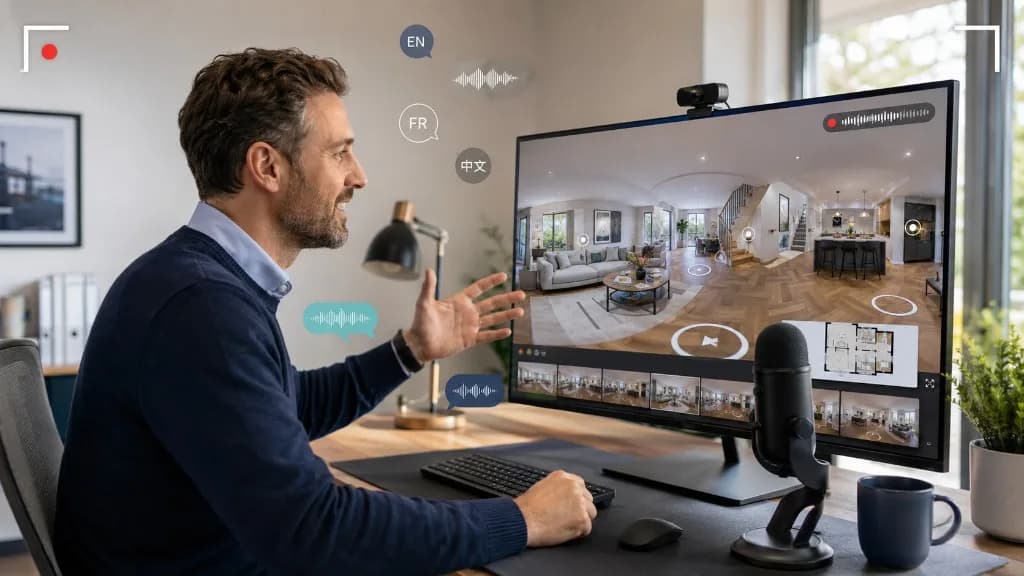
By combining 360Tours Studio with Screen Record, estate agents and property professionals can turn a standard virtual tour into a personal, presenter-led viewing that can be watched at any time and in almost any location.
What is a guided 360° virtual tour?
A guided 360° virtual tour is a recorded presentation in which an estate agent navigates through an interactive property tour while describing the home.
It combines the flexibility of a virtual tour with the personal service of an agent-led viewing.
The agent can guide the viewer through the entrance, reception rooms, kitchen, bedrooms and outside spaces while explaining features that may not be immediately obvious. These could include recent renovations, energy-efficient technology, storage areas, transport connections or the potential to extend the property, subject to the necessary permissions.
The agent can also appear on camera, making the experience feel more personal and helping prospective buyers build a connection with both the property and the agency.
Unlike a live virtual viewing, the presentation only needs to be recorded once. It can then be shared with multiple buyers and watched whenever it is convenient for them.
How 360Tours Studio and Screen Record work together
360Tours Studio allows property professionals to create engaging and interactive virtual tours using 360° images.
Once a tour has been created, the agent can open it on their computer and use Screen Record to record themselves navigating through the property. Screen Record can capture the screen, the agent’s voice and, if required, their camera at the same time.
This means the agent can:
- Move through each room in a logical order.
- Explain the layout and flow of the property.
- Point out important features.
- Highlight information hotspots within the tour.
- Appear on camera during the presentation.
- Create a recording that can be shared instantly.
The result is a reusable guided viewing that combines visual exploration with professional narration.
Why guided virtual tours are valuable for estate agents
A property listing may receive dozens of enquiries, but not every person who enquires will be a serious or suitable buyer. Arranging individual viewings can take a significant amount of time, particularly when properties are vacant, occupied or located outside an agent’s usual area.
A recorded guided tour allows buyers to explore the property in detail before booking an appointment. This can help them decide whether the location, layout and key features meet their requirements.
Those who subsequently request an in-person viewing are likely to have a better understanding of the property and potentially a stronger level of interest.
Guided recordings can also help estate agents:
- Reduce repetitive explanations.
- Qualify buyers before physical viewings.
- Provide more information than photographs alone.
- Offer viewings outside normal office hours.
- Support buyers who live further away.
- Create a more personal marketing experience.
- Demonstrate a modern approach to selling property.
The recording does not replace the traditional viewing. Instead, it gives buyers more information at an earlier stage and can make the eventual appointment more productive.
Reach international buyers with multilingual narration
One of the most powerful uses of Screen Record is the ability to make a single property presentation accessible to buyers who speak different languages.
After an agent records their original narration, AI can be used to transcribe, translate and recreate the voiceover in supported languages. Rather than recording the entire presentation again for every audience, the agent can create multilingual versions from the original recording.
This could be particularly useful for:
- Prime and luxury property.
- New-build developments.
- Overseas property sales.
- Investment opportunities.
- Relocation services.
- Properties marketed to international buyers.
A buyer may be comfortable reading an English property listing but still prefer a detailed viewing in their first language. Hearing the property explained clearly can make the information easier to understand and help the buyer feel more confident about making an enquiry.
The key principle is simple: record the tour once and share it in multiple languages.
How to record an effective property tour
Before recording, plan the route you want to take through the property. Starting at the entrance and following the natural layout of the home will make the presentation easier to understand.
Keep the narration conversational. You do not necessarily need a word-for-word script, but it helps to prepare a short list of the features you want to mention in each room.
For example, when entering the kitchen, you might discuss:
- The quality of the finishes.
- Integrated appliances.
- Natural light.
- Access to the garden.
- Dining or entertaining space.
- Any recent improvements.
Move through the tour at a comfortable speed and give viewers enough time to look around. Avoid rapidly changing direction, as this can make a 360° presentation harder to follow.
You should also keep the overall recording focused. Buyers are more likely to watch a clear and informative presentation than an unnecessarily long video. If the property is particularly large, consider creating separate recordings for different sections or floors.
What should be included in a guided virtual viewing?
An effective recording should cover the information that buyers usually want during an initial viewing.
This may include the property’s general layout, room sizes, condition, natural light, storage, outside space, parking arrangements and nearby amenities.
Agents can also explain details that cannot easily be communicated through images, such as how different rooms connect, which direction the garden faces or how the property could work for a family, remote worker or investor.
Interactive hotspots within the 360° tour can provide additional information, photographs, videos or links. The agent can draw attention to these while recording, giving the viewer the option to explore further afterwards.
Share the recording with prospective buyers
Once the guided tour has been recorded, it can be shared through a link rather than sending a large video file.
The link can be included in:
- Property enquiry replies.
- Email marketing campaigns.
- WhatsApp messages.
- Online property listings.
- Agency websites.
- Social media posts.
- Follow-up messages after a viewing.
Agents could also create different versions for different audiences. A short overview could be shared publicly, while a more detailed presentation could be sent to qualified buyers.
Because the recording can be watched on demand, buyers are not restricted by office hours, time zones or the availability of an agent.
A more personal way to market property remotely
Property marketing technology works best when it improves the experience without removing the human element.
360Tours Studio gives buyers the freedom to explore a property, while Screen Record allows the agent to provide context, personality and professional guidance.
Together, they create a flexible viewing experience that sits between a standard virtual tour and a live appointment. Buyers can explore the property at their own pace, while still benefiting from an agent’s knowledge.
For estate agents, developers and property marketers, this offers a practical way to present properties more effectively, reach a wider audience and make each virtual tour work harder.
Create the interactive experience with 360Tours Studio, guide buyers through it with Screen Record, and turn one virtual tour into a personal presentation that can be shared around the world.
- #virtual tours
- #360 tours
- #screen record
- #guided virtual tour
- #estate agent marketing
- #international buyers
- #multilingual narration
Frequently Asked Questions

The ReHub Studio Team
Property Marketing Experts
The ReHub Studio team builds AI-powered tools that help estate agents, photographers and developers create better property marketing, faster.
Ready to improve your property marketing?
Enhance photos, remove clutter, stage rooms, produce floor plans, create video and publish listings from one ReHub account.
Related Articles

360° Virtual Tours vs Photo Galleries — When Each Wins
Photo galleries sell emotion quickly. 360° tours help buyers understand space. Learn when to invest in a tour, when a strong gallery is enough, and how to use both without overspending.
What Is a Virtual Tour? The Complete Guide to Interactive Digital Experiences (2026)
Learn what a virtual tour is, how it works, the different types available, and why businesses use interactive virtual tours to increase engagement and sales.
Benefits of Virtual Tours for Estate Agents
360 virtual tours let buyers explore a property online at any time. Here are the main benefits for estate agents, from fewer wasted viewings to more leads.